


a better meal - Meal Planner
3.913.00 Reviews
App Specs
- Version
- 3.6.1
- Updated On
- License
- Free
- Downloads
- 10,000+
- Developer
- A Better Meal LLC
- Categories
- Food & Drink
- Platform
- Android
Screenshots

 Analysis by AppCompare
When I’m deciding whether to trust a meal-planning app, I look beyond attractive recipes. I want to know whether its suggestions fit my needs, how much work it saves me, and whether I can make my own choices instead of following a rigid plan. A Better Meal - Meal Planner is a free Food & Drink app from A Better Meal LLC, and its focus is practical: organize meals, find recipes, and make shopping easier. It has a 3.9 average from around 50 ratings, with over 10,000 installs, so it has an established audience without being one of the category’s household names.
Trust starts with fit, not promises
The app’s central idea is appealing if your usual dinner routine involves searching several recipe sites, keeping a separate note for groceries, and still forgetting one ingredient. Bringing planning and shopping tools together can reduce that mental juggling. The most useful question is whether the choices it presents suit your household; a polished plan is not helpful if it ignores the way you actually eat.
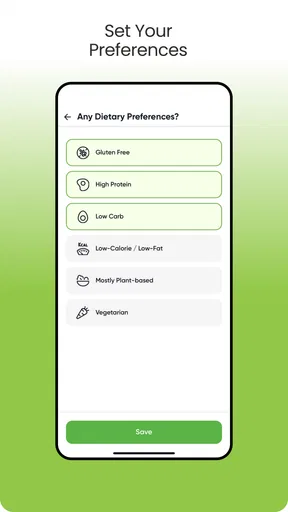
When you set food preferences, treat them as a starting point rather than a substitute for checking a recipe yourself. That matters especially if an allergy is involved: I would read the ingredient list and preparation instructions each time, even when a recipe appears to match a preference. Preferences can help narrow a search, but they do not remove the need for careful judgment about ingredients and cross-contact.
What you can control while planning
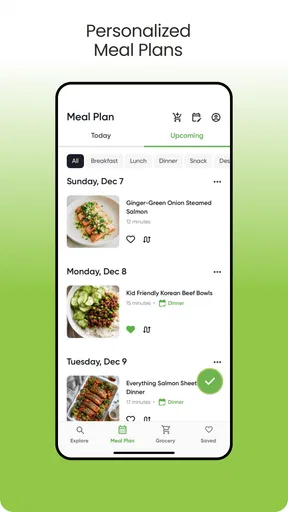
Meal plans work best when they leave room for real life. You might sketch out dinners for a few days, then decide later whether to extend the plan. That is a less intimidating way to use a calendar than trying to map out an entire month at once. It also gives you a chance to see whether the recipes suit your time, appetite, and shopping habits before committing to a longer routine.
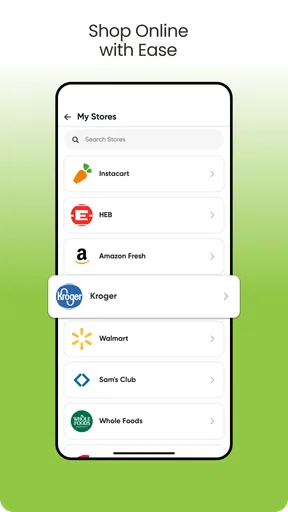
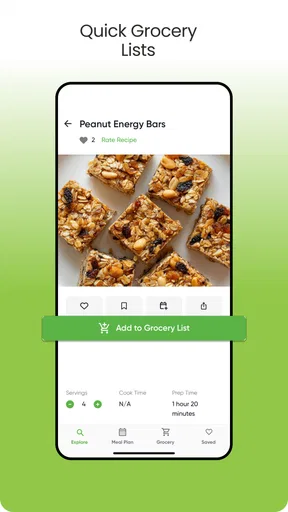
The grocery tools are most valuable after you have settled on meals. I’d review the resulting list before leaving home, especially if I planned several dishes that use the same staple. A quick check can help me avoid buying something I already have or missing a small ingredient that would derail dinner. The app can organize the task, but the final edit should still reflect what is in your cupboards and what your household will actually eat.
Where personal judgment still matters
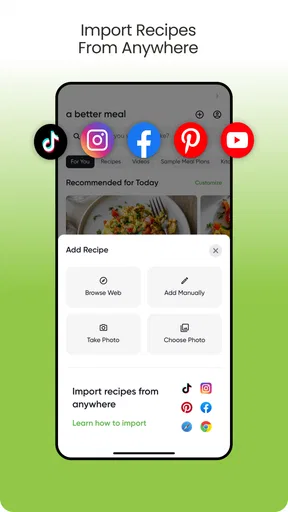
Recipe importing is a useful idea for anyone who saves dishes from different places and wants them closer to the rest of their planning. It may help bring scattered inspiration into one workflow, but I would still check an imported recipe for clear quantities, sensible steps, and ingredients that fit my needs. A saved recipe is only as usable as the details it contains.
There is also a practical difference between a recipe collection and a dependable weekly plan. A collection is good for browsing; planning asks you to consider how ingredients overlap, how much time you have, and whether leftovers will be welcome. I would use the app to shortlist meals, then make those decisions before treating the calendar as settled. That small pause helps prevent an ambitious plan from turning into food waste or a stressful weeknight.
Worth Reading Before You Choose

Flipboard Shows What News Apps Must Do Beyond the Feed

Switching to Android Auto Means Rethinking Your Driving Routine

Google Calendar Makes a Crowded Week Easier to Manage

Ludo King Makes the Most of the Minutes Between Plans

Baby Panda World Brings Quick Play to Modern Phones, but Its Game Library Feels Busy

ESPN’s Live Game View Makes Following Close Games Easier
The app is free to download, while in-app purchases range from $4.99 to $199.99 per item. I’d check the purchase screen carefully before paying for anything and decide whether the free experience already covers my needs. The age rating is Everyone, and the current version is 3.5.4, with Android 7.0 as the minimum operating system. Those details make it easier to judge basic compatibility, but they don’t tell me whether a particular paid option is worthwhile for my routine.
A cautious verdict on choice and privacy
I’m careful about what I enter into any food app. Dietary preferences can be personal, and an account or saved plan may reveal habits that I would rather keep private. I would look at the app’s permission prompts and available account controls as I use it, granting only what seems necessary for the task. I would not assume that a recipe preference tells me everything about how an app handles information; my comfort depends on the choices and explanations presented in the app itself.
That caution does not make the planning concept less useful. It simply means I would keep the information I share proportionate to the benefit I get. If I only need a few dinner ideas and a shopping list, I would avoid entering details that do not help with those jobs. If I decide to stop using the service, I’d check the account options rather than assume deleting the app also removes any account information.
Overall, I see this as a potentially helpful organizer for people who want recipes, meal planning, and grocery preparation in one place, provided they remain comfortable with the choices the app presents. I would not rely on it alone for allergy safety or assume every plan will match my schedule without adjustment. Its appeal is strongest when it supports my decisions instead of making them for me.
Ever found yourself staring into the fridge, wondering what on earth to cook for dinner? Trust me, I've been there more times than I can count. Well, fear not because a nifty little app called A Better Meal - Meal Planner might just be the solution you're looking for. I gave it a whirl on my phone, and let me tell you, it’s like having a personal chef in your pocket!
Getting Started with A Better Meal
First things first, setting up A Better Meal - Meal Planner is a breeze. Once you download it from the App Store or Google Play, which by the way is super quick, you're greeted with a clean and intuitive interface. I appreciate an app that doesn’t bombard you with unnecessary stuff right from the get-go. It’s all about meal planning here, plain and simple.
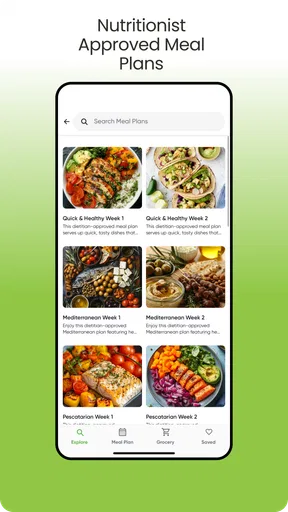
As soon as you log in, the app asks you about your dietary preferences. Whether you're vegan, gluten-free, or a lover of all things meat, there’s something for everyone. I’m a pescatarian, so I was pleased to see plenty of options for fish and seafood lovers like me. It even takes into account any allergies you might have, which is a lifesaver.
Features That Make Life Easier
The app’s main feature is the meal planner, and honestly, it’s a game-changer. You can plan your meals for the week or even the whole month if you’re feeling ambitious. Just drag and drop recipes into your calendar. It’s as easy as pie, and speaking of pie, there are some delightful dessert recipes you might want to check out!
Now, I’m not exactly what you’d call a master chef, so the built-in grocery list feature was a godsend. It automatically creates a shopping list based on the meals you’ve selected. No more wandering aimlessly through grocery store aisles. It even categorizes items, making your shopping trip faster and more efficient. If only it could do the shopping for me!
Cooking with Confidence
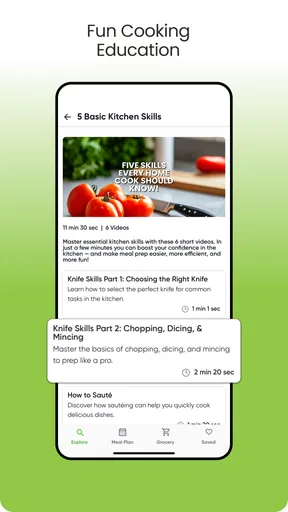
One of my favorite parts of using this app is the step-by-step cooking instructions. I’m not ashamed to admit that I sometimes struggle to boil an egg, but with these easy-to-follow guides, even I can whip up a decent meal. The instructions are clear, and there are helpful tips sprinkled throughout to prevent any kitchen mishaps.
If you’re like me and enjoy a bit of variety, the app offers a huge database of recipes to choose from. Whether you’re in the mood for something exotic or just a classic comfort dish, you’re covered. Plus, you can even contribute your own recipes to the community. Who knows, maybe your grandma’s secret lasagna recipe will become a viral sensation!
How I’d fit it into a real week
For a busy weekday, I’d use the planner as a decision-making aid rather than a strict schedule. On the weekend, I’d pick a few dinners I know I can manage, place them across the days I expect to cook, and check the grocery list before shopping. I’d leave one evening open for leftovers or plans changing. That approach makes the calendar useful without turning it into another obligation to keep up with.
For example, if I know Tuesday will be rushed, I’d put a simpler recipe there and save a more involved dish for a night when I have time. I’d also scan the selected recipes for ingredients that repeat, then check my pantry before buying them. The list is a helpful starting point, but this little review is what keeps a tidy plan from becoming an overstuffed shopping basket.
Recipe importing can be especially handy for people who already collect ideas elsewhere. Rather than treating every saved dish as an immediate meal, I’d use imported recipes as a shortlist: check that the quantities and steps are complete, decide whether the ingredients are easy to find, and only then add the recipe to a plan. That extra filter is useful because a recipe that looks appealing on a screen may not suit a particular week’s budget, time, or appetite.
Who will get the most from it
I’d recommend trying it if you often ask “what’s for dinner?” at the last minute, enjoy cooking but dislike organizing, or want a clearer path from choosing a recipe to buying ingredients. It may also suit someone who wants to explore meals around dietary preferences while keeping plans and shopping in a single routine. The benefit is less about discovering one perfect dish and more about reducing the number of separate decisions that stand between an idea and dinner.
It is less compelling for someone who already has a reliable meal-planning system, a well-organized recipe manager, and a grocery app that works exactly the way they like. If you prefer to improvise from what is already in the kitchen, a calendar-based plan might feel restrictive rather than helpful. Likewise, if you need medically precise nutrition tracking, I would choose a tool built specifically for that purpose instead of assuming a recipe planner can cover it.
Compared with the usual alternatives, this app aims to connect recipe discovery, a calendar, and a shopping list instead of making you move between a browser, notes app, and grocery checklist. A basic notes app gives you more freedom but requires you to organize everything yourself. A recipe website may offer plenty to browse but can leave planning and shopping as separate chores. The trade-off here is convenience in one workflow versus the flexibility of tools you already know; whether that feels like an improvement depends on how much structure you want.
Small checks that make the plan more dependable
Before I commit to a week, I’d avoid scheduling a new recipe every night. Mixing familiar meals with one or two new ones gives me a better chance of following through, and it makes the shopping list less unpredictable. I’d also check whether a recipe uses a perishable ingredient across multiple planned meals; if not, I’d consider swapping a dish or moving it earlier in the week. That is a simple way to make the plan work with actual groceries instead of treating each recipe as an isolated choice.
For shared meals, I’d review every recipe with the people who will eat it rather than relying only on a general preference setting. Preferences can guide discovery, but household tastes change, and one person’s “quick dinner” may not work for everyone. If I’m cooking for guests or someone with an allergy, I’d verify the ingredients and preparation myself and ask what they can safely eat. That is a sensible boundary for any recipe tool.
The free download makes it easy to see whether the basic routine suits you, but the in-app purchase range is broad enough that I would not tap through a purchase prompt casually. I’d first identify exactly what an offered item includes and whether I would use it often. If the core planning and list workflow is already doing the job, there is no reason to pay simply because an upgrade is available. The right choice depends on the specific option and your own habits, not on the size of the plan you can build.
Wrapping It Up
So, what’s the verdict? Well, in my humble opinion, A Better Meal - Meal Planner is a must-try for anyone looking to simplify their meal planning process. It’s user-friendly, packed with features, and honestly just makes life easier. I’ve found myself actually looking forward to cooking, which is something I never thought I’d say.
Whether you’re a busy professional, a parent trying to juggle mealtime with a million other things, or just someone who wants to eat better without the fuss, this app could be your new best friend. Give it a download, and get ready to transform your kitchen routine. Happy cooking!
Pros
- User-friendly interface for easy navigation.
- Customizable meal plans to suit any diet.
- Includes a vast recipe database.
- Shopping list feature simplifies grocery trips.
- Nutrition tracking for balanced meals.
Cons
- Limited offline functionality.
- Some features require premium upgrade.
- Occasional app crashes reported.
- Sync issues between devices.
- Limited integration with other health apps.
FAQs for a better meal - Meal Planner
What features does the Better Meal - Meal Planner app offer?
The Better Meal - Meal Planner app offers a variety of features including customizable meal plans, a comprehensive recipe library, grocery list generation, and nutritional tracking. Users can set dietary preferences, plan meals for the entire week, and even sync their plans across multiple devices for easy access.
Is the Better Meal - Meal Planner app suitable for specific diets?
Yes, the app supports a wide range of dietary preferences such as vegan, vegetarian, keto, and gluten-free. Users can easily filter recipes and meal plans based on their dietary needs, ensuring that all meals align with their nutritional goals and restrictions.
How user-friendly is the Better Meal - Meal Planner app?
The app is designed with user-friendliness in mind, featuring an intuitive interface that makes meal planning straightforward. Users can navigate through meal options, recipe databases, and grocery lists with ease, making it accessible for both beginners and seasoned meal planners.
Can the Better Meal - Meal Planner app help save time and money?
Absolutely. By organizing meals in advance, the app helps users avoid unnecessary purchases and reduce food waste. The grocery list function ensures you only buy what you need, while also minimizing the time spent planning and shopping. This efficiency can lead to significant savings over time.
Does the Better Meal - Meal Planner app offer any collaboration features?
Yes, the app allows for collaborative planning, where users can share meal plans and recipes with family or friends. This feature is particularly useful for households looking to coordinate meals or for groups wanting to share their culinary experiences and favorite dishes.


